
Introduction
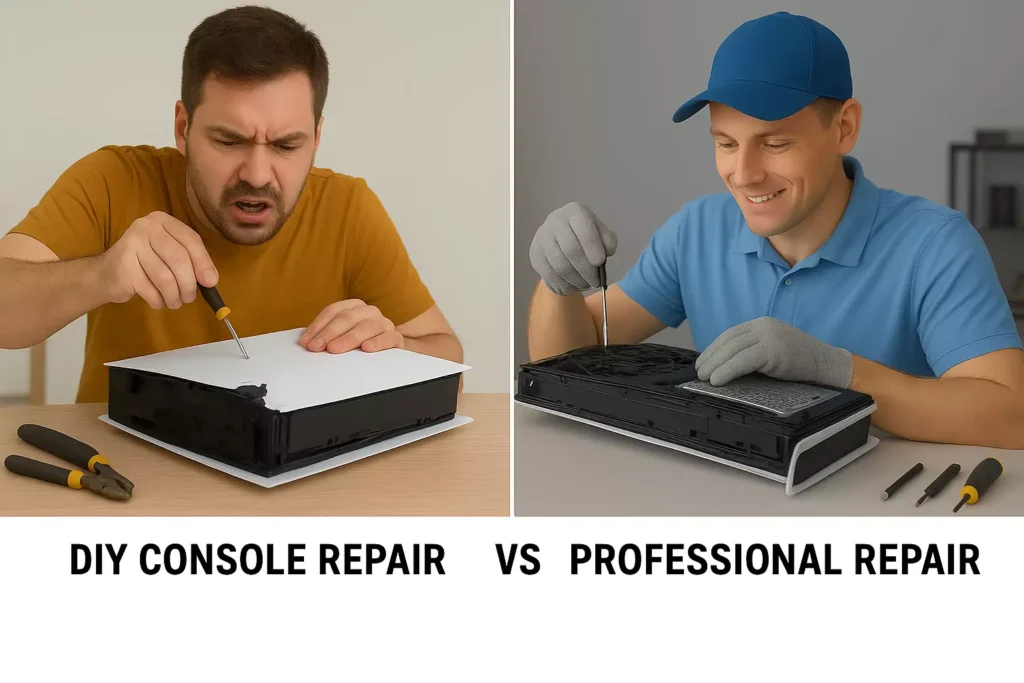
If you’ve ever typed DIY console repair often makes things worse into a search bar, you’re not alone. Gamers across the world, from casual Nintendo Switch players to hardcore PlayStation and Xbox enthusiasts, try to fix their consoles at home when problems arise. While DIY repairs might seem like a quick and cheap solution, the harsh reality is that they often create more damage, higher costs, and longer downtime.
In this in-depth, guide, we’ll explore the 7 most common reasons DIY console repair often makes things worse, backed by real-world examples, practical solutions, and expert insights. Most importantly, you’ll discover what to do instead—so you don’t end up with a bricked console and an empty wallet.
1. Why Gamers Attempt DIY Console Repair
- Cost-saving motives: Buying tools on Amazon seems cheaper than service fees.
- Overconfidence: Many gamers assume “If I can build a PC, I can fix a console.”
- YouTube tutorials: Thousands of “easy repair” videos oversimplify complex fixes.
- Curiosity: Taking apart a console feels like a learning experience.
- Urgency: Gamers don’t want to wait weeks for service.
Unfortunately, these motivations often backfire.
2. The 7 Negative Truths About DIY Console Repair
2.1 Lack of Proper Tools
Most consoles require specialized screwdrivers, soldering equipment, and anti-static mats. Using household tools often strips screws, cracks plastic, or damages delicate boards.
Example:
A gamer tried fixing an Xbox Series X fan with a butter knife and ended up damaging the internal casing.
2.2 Misdiagnosis of Problems
A console not turning on might be:
- A faulty power supply
- A blown capacitor
- Firmware corruption
- Or a dead motherboard
DIYers often “guess” and replace the wrong part, wasting money and time.
2.3 Static Electricity Risks
Without anti-static precautions, you can fry your motherboard just by touching it.
Fact: A small electrostatic discharge (ESD) that you can’t even feel can permanently destroy console circuits.
2.4 Cheap Parts and Counterfeits
Amazon and eBay are filled with fake HDMI ports, knockoff controllers, and low-grade chips.
- They might work temporarily
- But fail quickly
- Or cause even worse damage
2.5 Software & Firmware Mistakes
Gamers often brick their consoles by:
- Installing unofficial firmware
- Using sketchy jailbreak tools
- Attempting “quick fixes” for bugs
2.6 Voiding Your Warranty
DIY repairs often void your manufacturer warranty.
Sony, Microsoft, and Nintendo all reject consoles that have been tampered with.
2.7 Escalating Minor Issues into Major Ones
A simple HDMI port replacement can escalate into:
- Damaged traces on the motherboard
- Broken heatsinks
- Non-repairable power issues
3. Comparison Table: DIY vs Professional Console Repair
| Factor | DIY Repair | Professional Repair |
|---|---|---|
| Cost (short-term) | Low | Moderate |
| Cost (long-term) | High (due to mistakes) | Low |
| Tools Required | Many specialized tools | Already included |
| Risk of Damage | Very High | Minimal |
| Warranty | Voided | Preserved (or shop warranty) |
| Repair Time | Uncertain | Predictable |
| Success Rate | Low | High |
4. Safe Alternatives to DIY Console Repair
Instead of opening your console:
- Use official troubleshooting guides from Microsoft, Sony, or Nintendo.
- Check cables and connections first.
- Use cooling stands or clean vents to reduce overheating.
- Back up data to avoid loss.
- Contact a professional repair service when hardware issues persist.
5. Case Studies of Common Console Repairs
PlayStation 5 – HDMI Port Failure
DIYer damages motherboard → Repair bill doubles.
Xbox Series X – Overheating Issue
Fan replaced incorrectly → Console won’t boot.
Nintendo Switch – Joy-Con Drift
DIY cleaning worsens drift → Professional replacement required.
6. Expert Tips for Console Longevity
- Keep consoles in cool, ventilated spaces
- Clean dust every 3–6 months
- Avoid overcharging controllers
- Use surge protectors to prevent power damage
- Update firmware regularly
7. What to Do Instead: Professional Repair Options
Instead of risking DIY, use a trusted repair center like:
- Local certified shops
- Manufacturer service centers
- Reputable independent repair experts
8. Why Choose Arora Tech in New Jersey
Arora Tech specializes in console, phone, and gadget repair with expert technicians.
📍 Visit Us At:
Next to UGG’s, 100 Premium Outlets Dr Store #785, Gloucester Premium Outlets, Blackwood, NJ 08012, United States
📞 Call Now: +1 856-723-6939
📧 Email Us: techbyarora@gmail.com
🔗 Helpful Links:
9. Call-to-Action: Contact Arora Tech Today
Stop risking your console with DIY repairs. Trust experts instead.
- ✅ Faster turnaround
- ✅ Warranty-backed service
- ✅ Expert diagnostics
👉 Fill out the Repair Form today and get your console working again.
10. Final Thoughts
DIY console repair often makes things worse. While it may seem like a money-saving shortcut, it usually leads to higher costs, voided warranties, and more damage.
For peace of mind, trust professionals like Arora Tech in New Jersey. We’re here to help you get back to gaming safely and quickly.
🔗 Learn more on our Google Business Profile.

 by
by
One Response
I don’t think the title of your article matches the content lol. Just kidding, mainly because I had some doubts after reading the article.