
Introduction: Why Timely Mac Repair Matters More Than You Think
Apple’s Mac computers are known for their sleek design, stable performance, and long lifespan. But even the most reliable devices need maintenance and occasional fixes. The truth is, neglecting small problems can lead to bigger, costlier Mac Repair needs down the road.
If your Mac feels slower, makes strange noises, or frequently crashes, these may be early signs that something’s wrong. Addressing these problems quickly through a trusted Mac Repair service can prevent data loss, overheating, and long-term damage.
At Arora Tech, our team in Gloucester Outlets, New Jersey, specializes in diagnosing and repairing MacBooks, iMacs, and other Apple devices. We believe that by helping customers understand the root causes of these issues, we can save them both time and money in the long run.
Let’s dive into the 7 critical issues that can seriously affect your Mac’s performance if ignored—and how proper Mac Repair can restore it to peak condition.
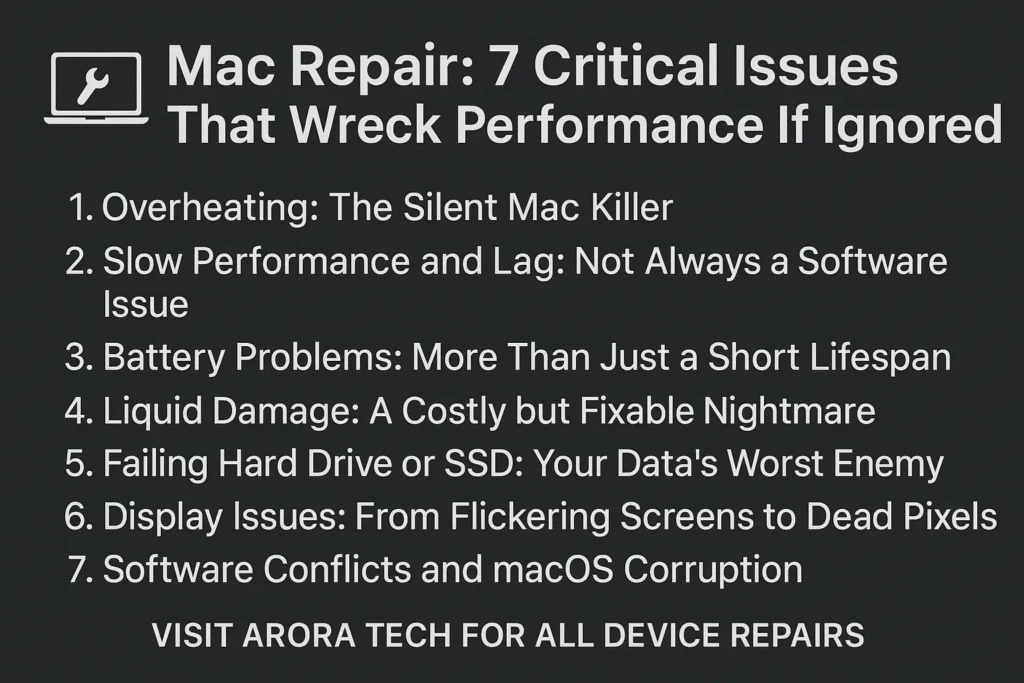
1. Overheating: The Silent Mac Killer
Nothing damages internal components faster than heat. When your Mac overheats, it’s not just uncomfortable—it’s dangerous. Prolonged high temperatures can degrade your motherboard, warp your battery, and cause random shutdowns.
Why Overheating Happens
- Blocked air vents due to dust buildup.
- Aging or faulty cooling fans.
- Using the Mac on soft surfaces like beds or couches.
- Heavy multitasking without proper ventilation.
The Fix
Professional Mac Repair technicians clean the internal fans, reapply thermal paste, and test heat sensors to ensure everything is running cool and smooth.
At Arora Tech, we’ve seen many devices saved simply through deep cleaning and fan replacement. If your Mac feels hot to touch, it’s time to schedule a Mac Repair appointment before it’s too late.
2. Slow Performance and Lag: Not Always a Software Issue
A sluggish Mac isn’t always caused by too many open apps or old software. Sometimes, it’s a hardware issue waiting to be addressed.
Common Hardware-Related Causes
- Failing hard drive or SSD.
- Insufficient RAM for current workloads.
- Background malware or corrupted cache files.
How a Mac Repair Service Helps
Through diagnostic testing, Mac Repair experts can pinpoint whether your slowdown is due to faulty hardware, outdated software, or even hidden malware.
At Arora Tech, we perform deep optimization, SSD upgrades, and RAM installations that drastically improve speed. Our customers in Gloucester, NJ, often notice instant performance boosts after these fixes.
3. Battery Problems: More Than Just a Short Lifespan
If your MacBook battery drains unusually fast or refuses to charge, it’s not something to ignore. Battery degradation affects your device’s portability and, in severe cases, can damage the motherboard.
Signs You Need Battery Repair
- Mac shuts down unexpectedly at high battery levels.
- “Service Battery” or “Replace Soon” warnings appear.
- Device gets hot while charging.
Professional Mac Repair Approach
During a Mac Repair, technicians test battery health and charging circuits. At Arora Tech, we only use premium-quality battery replacements to restore performance and safety.
Ignoring battery issues can eventually make your MacBook unsafe to use. Schedule your repair via our Repair Form today for quick help.
4. Liquid Damage: A Costly but Fixable Nightmare
Spilled coffee, juice, or water can lead to instant panic—but all hope isn’t lost. Liquid damage is one of the most common reasons for Mac Repair requests.
What Happens When Liquids Enter Your Mac
- Short circuits fry critical components.
- Corrosion spreads across the logic board.
- The keyboard and trackpad stop responding.
Immediate Actions
- Power off the device immediately.
- Do not try to charge it.
- Bring it to a Mac Repair shop as soon as possible.
At Arora Tech, we use ultrasonic cleaning and advanced drying methods to rescue devices affected by spills. Many of our Gloucester clients are surprised at how recoverable “dead” Macs can be with the right expertise.
5. Failing Hard Drive or SSD: Your Data’s Worst Enemy
A failing hard drive doesn’t just mean slower boot times—it can result in complete data loss.
Warning Signs
- Clicking or grinding noises.
- Frequent “beach ball” freezes.
- Missing files or corrupt data.
When you bring your Mac in for Mac Repair, we run drive diagnostics and, if needed, clone your data before replacement. At Arora Tech, we offer SSD upgrades that make older Macs faster and more reliable than when new.
6. Display Issues: From Flickering Screens to Dead Pixels
Your Mac’s screen is its window to the world, and when it’s compromised, productivity takes a huge hit.
Common Display Problems
- Backlight failure.
- Flickering or color distortion.
- Cracked or unresponsive Retina screens.
How Mac Repair Solves It
Our technicians perform component-level screen repairs and replacements, ensuring your Mac looks and functions perfectly again.
At Arora Tech, we handle everything from simple cable fixes to full Retina display replacements. Ignoring screen problems can lead to permanent damage or strain your eyes during long hours of work.
7. Software Conflicts and macOS Corruption
Even the best hardware can’t perform well with buggy software. macOS corruption, incompatible updates, or rogue third-party apps can make your Mac unstable.
Typical Symptoms
- Frequent crashes or freezes.
- Apps won’t open or quit unexpectedly.
- macOS updates fail to install.
Professional Repair Solution
A skilled Mac Repair expert can reinstall macOS, recover lost data, and ensure all drivers and system files are properly configured.
At Arora Tech, we help customers get back on track without losing valuable data, ensuring smooth and secure operation.
When to Seek Professional Mac Repair Help
If any of these seven issues sound familiar, it’s best not to wait. The longer you delay, the worse the damage can become—and the higher the repair costs.
You can reach out to Arora Tech through our Contact Page or directly fill out our Repair Form for fast assistance.
Our technicians are certified, experienced, and dedicated to restoring your Mac’s performance safely and efficiently.
Why Choose Arora Tech for Your Mac Repair Needs
Here’s why Gloucester residents trust us for all their Mac Repair needs:
- Expert Diagnostics: We find the real cause of the issue, not just the symptom.
- Premium Parts: Only high-quality components are used.
- Transparent Pricing: No hidden fees or surprise charges.
- Quick Turnaround: Most repairs completed within 24–48 hours.
- Customer-Focused Service: We treat every Mac like our own.
Whether you’re dealing with a slow MacBook Air or a dead iMac, our specialists ensure your device runs like new again.
Visit or Contact Arora Tech
We’re located conveniently at:
Next to UGG’s, 100 Premium Outlets Dr Store #785, Gloucester Premium Outlets, Blackwood, NJ 08012, United States.
View on Google Maps
📞 Call Now — +1 856-723-6939
📧 Email Us — techbyarora@gmail.com
To learn more about our services, check out our Services Page or read our latest Blog Posts.
Final Thoughts
Ignoring small issues in your Mac can snowball into massive problems that ruin both performance and reliability. By recognizing these 7 common problems early—and seeking professional Mac Repair services—you can keep your device healthy for years to come.
Whether it’s a failing SSD, overheating issue, or liquid damage, timely intervention is the key. The experts at Arora Tech are always ready to help Gloucester residents with fast, affordable, and high-quality Mac Repair solutions.
👉 Visit our Google Profile to learn more or schedule a consultation today.

 by
by
2 Responses
Your point of view caught my eye and was very interesting. Thanks. I have a question for you.
Thanks. How can I help?