
Introduction: Why Tablet Battery Replacement Matters More Than You Think
In today’s digital age, tablets have become an extension of our work, entertainment, and creativity. Whether you’re editing photos, streaming shows, or attending meetings, your tablet’s battery is the lifeline that powers it all. But when that battery starts to fade, frustration quickly follows.
That’s where Tablet Battery Replacement becomes essential. This service not only restores performance but also extends your device’s lifespan significantly. Ignoring early signs of battery degradation can lead to overheating, slow charging, and in severe cases, permanent motherboard damage.
In this post, we’ll discuss the 9 crucial fixes that help tablets last longer and the role Tablet Battery Replacement plays in ensuring consistent performance. By the end, you’ll know how to maintain your device like a pro — and where to go when professional repair is your best option.
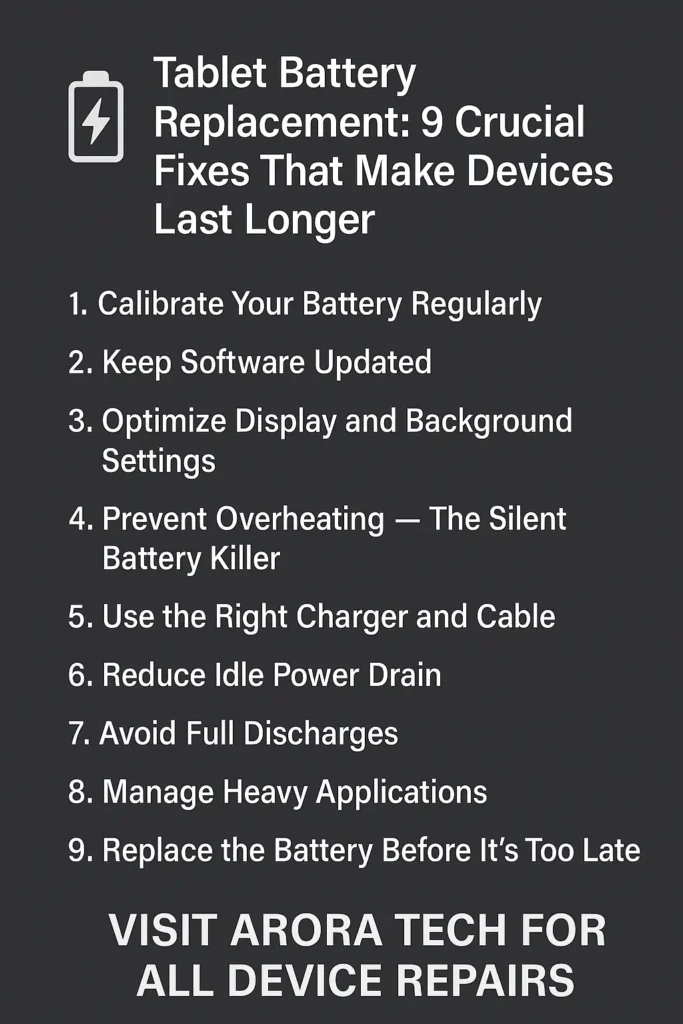
1. Calibrate Your Battery Regularly
Battery calibration is one of the most overlooked maintenance steps — yet it’s vital for preserving your tablet’s health. Over time, your battery’s internal meter can lose accuracy, leading to incorrect charge readings.
To calibrate:
- Fully charge your tablet to 100%.
- Use it continuously until it shuts down due to low battery.
- Recharge it back to 100% without interruptions.
Performing this once every 2–3 months helps the system reset its battery status, ensuring accurate readings and stable performance. If your battery still drains too quickly afterward, it could be time for a Tablet Battery Replacement.
2. Keep Software Updated
Software updates don’t just add new features — they often optimize power consumption. Outdated operating systems or buggy apps can drain your battery much faster than usual.
Manufacturers frequently release updates to fix background process inefficiencies. That’s why ensuring your iPadOS, Android, or Windows tablet is always up-to-date is crucial.
If your device heats up or the battery percentage fluctuates after an update, consult a technician at Arora Tech to inspect whether the battery is weakening. Sometimes, the issue lies not in software but in the hardware itself, requiring a Tablet Battery Replacement.
3. Optimize Display and Background Settings
Brightness, animations, and background apps silently eat away at your tablet’s battery life. Reducing screen brightness and turning off unused background apps can easily add hours of runtime.
Try these quick optimizations:
- Enable “Auto-Brightness” or “Adaptive Brightness.”
- Set screen timeout to 30 seconds.
- Disable location services for unused apps.
- Turn on battery saver mode when not charging.
If you’ve done all this but still notice the battery draining abnormally fast, your device may need a Tablet Battery Replacement to regain its original efficiency.
4. Prevent Overheating — The Silent Battery Killer
Excessive heat is one of the fastest ways to shorten battery lifespan. Leaving your tablet in a hot car, charging overnight, or gaming for long sessions can degrade lithium-ion cells faster than you’d expect.
Heat causes internal resistance, reducing battery capacity over time. To prevent damage:
- Avoid using heavy apps while charging.
- Keep your tablet in a cool environment.
- Remove protective cases while charging if it gets warm.
Once a battery begins to swell or gets hot even during light use, it’s time for a Tablet Battery Replacement. Don’t wait — swollen batteries can damage your device’s internals or even pose safety risks.
5. Use the Right Charger and Cable
Using low-quality or non-certified chargers is a leading cause of poor battery performance and damage. Cheap cables often deliver inconsistent voltage, putting stress on your tablet’s charging circuitry.
Always use manufacturer-recommended chargers. For iPads, stick with certified Apple adapters; for Androids, use original or high-quality third-party brands like Anker or Belkin.
If your tablet takes hours to charge or loses power quickly after unplugging, a technician can perform diagnostics. In some cases, the charging port is fine, but the battery cells are worn out — a clear sign that you need a Tablet Battery Replacement.
6. Reduce Idle Power Drain
Even when idle, your tablet consumes power — from background syncs to system maintenance tasks. To minimize this:
- Turn off Wi-Fi, Bluetooth, or mobile data when not in use.
- Disable push notifications for unnecessary apps.
- Restrict background app refresh.
If your device still drains 10–20% battery overnight without usage, the issue may be internal. Visit Arora Tech’s Contact Page and use the Repair Form to schedule a diagnostic check. You might be due for a professional Tablet Battery Replacement to fix hidden power leaks.
7. Avoid Full Discharges
It’s a common myth that you should let your tablet battery drain completely before recharging. In fact, lithium-ion batteries degrade faster when they go below 10%.
Ideally, keep your charge level between 20% and 80%. Partial charging extends the overall life cycle of your battery. However, if you’ve frequently deep-discharged your tablet in the past, its capacity might already be reduced.
Technicians at Arora Tech, located Next to UGG’s, 100 Premium Outlets Dr Store #785, Gloucester Premium Outlets, Blackwood, NJ 08012, United States, can help assess if a Tablet Battery Replacement is the right fix.
8. Manage Heavy Applications
Resource-heavy apps like high-definition games or 3D modeling tools drain more power than you think. These apps push your processor and GPU to the limit, resulting in high battery consumption and heat buildup.
To manage this:
- Close unused tabs in browsers.
- Limit background refresh.
- Monitor app battery usage via your tablet’s settings.
If you notice your battery life plummeting after using certain apps — even after updates — it’s a good idea to get your battery’s health professionally tested. A Tablet Battery Replacement might restore hours of lost power.
9. Replace the Battery Before It’s Too Late
Finally, no matter how carefully you use your tablet, batteries have a natural lifespan. After about 500–1000 charge cycles (roughly 2–3 years of regular use), they lose a significant portion of their capacity.
When symptoms like these appear, replacement becomes inevitable:
- Tablet shuts off unexpectedly.
- Battery drains faster than normal.
- Device overheats even in light use.
- Bulging back panel or screen lift.
At this stage, the best and safest solution is a Tablet Battery Replacement.
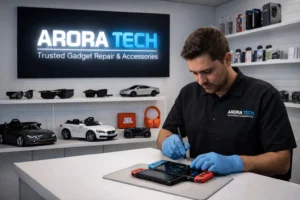
Professional repair shops like Arora Tech specialize in replacing batteries for tablets of all brands — including Apple, Samsung, Lenovo, and Microsoft. The process is quick, affordable, and ensures that your tablet performs like new again.
The Role of Professional Repair Experts
While DIY repair videos make battery replacement look easy, tablets have intricate designs — with adhesives, hidden screws, and fragile connectors. Improper handling can cause severe internal damage.
That’s why it’s always better to trust a professional team. Arora Tech’s technicians use precision tools and original-grade batteries to ensure safety and longevity. Whether it’s an iPad Air, Samsung Galaxy Tab, or Microsoft Surface, they handle each device with care and expertise.
And if you’re unsure whether your tablet needs a new battery or a simple tune-up, you can always reach out via:
- 📞 Call Now: +1 856-723-6939
- 📧 Email: techbyarora@gmail.com
You can also visit the store Next to UGG’s, 100 Premium Outlets Dr Store #785, Gloucester Premium Outlets, Blackwood, NJ 08012, United States for on-site diagnosis and same-day repairs.
Signs You Should Replace Your Tablet Battery Immediately
If you’re unsure whether your tablet is due for a new battery, here are clear indicators:
- Battery drops from 60% to 10% in minutes.
- Tablet powers off at random.
- Swelling or screen separation.
- Battery percentage fluctuates while charging.
- Overheating without heavy use.
When these symptoms occur, it’s not just about convenience — it’s about safety. Swollen batteries can lead to device breakage or leakage. Don’t risk it; get a Tablet Battery Replacement right away at Arora Tech.
Why Choose Arora Tech for Tablet Battery Replacement
While there are many repair shops, few match Arora Tech’s attention to detail, genuine parts, and transparent pricing. Here’s what sets them apart:
- Expert Technicians: With years of experience handling tablets, Arora Tech’s team ensures every replacement is safe and precise.
- Quick Turnaround: Most Tablet Battery Replacement services are completed within the same day.
- Warranty Coverage: Every replaced battery comes with a warranty for peace of mind.
- Customer-Centric Service: From diagnostics to aftercare, Arora Tech treats your device like it’s their own.
Visit Arora Tech’s Services Page for more details or Contact Us to get an instant quote.
Conclusion: Small Fixes, Long-Term Results
Battery health determines how long your tablet can stay relevant, productive, and enjoyable to use. Whether you’re a student, designer, or professional, taking small steps to preserve your device’s power can save you hundreds in replacement costs.
When maintenance isn’t enough, a professional Tablet Battery Replacement restores performance and reliability — making your device feel brand new again.
So, if your tablet isn’t lasting as long as it used to, don’t ignore the signs. Visit Arora Tech at the Gloucester Premium Outlets, or reach out through the Repair Form to schedule a diagnostic session today.
For directions, click here:
📍 Next to UGG’s, 100 Premium Outlets Dr Store #785, Gloucester Premium Outlets, Blackwood, NJ 08012, United States
Or explore more useful repair tips at Arora Tech’s Blog.
Outgoing Link
For reviews and location details, check Arora Tech on Google.



 by
by