
Introduction: Why iPhone & Android Camera Focus Issues Are Worse in 2026
If your iPhone & Android Camera suddenly refuses to focus, blurs every photo, or keeps “hunting” for clarity, you’re dealing with one of the most frustrating smartphone problems of modern times. The iPhone & Android Camera has evolved into a powerful imaging system—sometimes even replacing professional cameras—but that sophistication also means more things can go wrong.
In 2026, smartphones feature larger sensors, AI-assisted autofocus, sensor-shift stabilization, periscope zoom lenses, and multi-camera arrays. While these innovations produce incredible photos, they also make the iPhone & Android Camera more vulnerable to drops, dust intrusion, moisture damage, and software conflicts.
This guide is written for everyday users—not engineers. Whether you rely on your phone for social media, work, family photos, or business listings, we’ll help you understand:
- Why your iPhone & Android Camera won’t focus
- What quick fixes actually work
- When professional repair is necessary
- How modern repair solutions in 2026 restore camera performance
By the end, you’ll know exactly what to do next—and how to avoid costly mistakes.
How Camera Autofocus Works on iPhone & Android Devices
Before fixing a problem, it helps to understand how the iPhone & Android Camera autofocus system works.
Key Components of Smartphone Autofocus
Modern smartphones rely on multiple systems working together:
- Phase Detection Autofocus (PDAF)
Uses pixel pairs on the sensor to calculate focus instantly. - Laser Autofocus (LAF)
Sends a laser beam to measure distance—common in Android flagships. - Contrast Detection
Adjusts focus until the sharpest contrast is detected. - AI Scene Recognition
Identifies faces, text, pets, or objects to prioritize focus.
If any one of these systems fails, your iPhone & Android Camera may refuse to focus correctly.
Common Signs Your iPhone & Android Camera Has a Focus Problem
You may be experiencing a camera focus issue if you notice:
- Constant blurry photos
- Camera “breathing” or pulsing in and out of focus
- Clicking or buzzing sounds when opening the camera
- Focus working only at certain distances
- Rear camera blurry, but front camera clear
- Camera app freezing or crashing
These symptoms usually indicate hardware damage, contamination, or software conflict.
Top Reasons iPhone & Android Camera Won’t Focus in 2026
1. Physical Impact or Drop Damage
Even a small drop can knock delicate camera components out of alignment. Sensor-shift stabilization, now common in iPhones, is particularly sensitive.
Result:
- Autofocus motor misalignment
- Shaking or clicking noise
- Permanent blur
2. Dust or Debris Inside the Lens
Modern phones aren’t completely dustproof. Pocket lint, sand, or micro-debris can enter through speaker grills or cracked seals.
Result:
- Hazy or cloudy images
- Focus works intermittently
- Light glare or halos
3. Moisture or Humidity Exposure
Steam from showers, rain, or accidental spills can affect camera modules—even without obvious water damage.
Result:
- Foggy lens
- Focus failure after temperature changes
- Corrosion over time
4. Software Glitches & OS Updates
In 2026, camera software is deeply tied to AI. Bugs can break autofocus after updates.
Result:
- Camera won’t focus in certain apps
- Works in safe mode but not normally
- Focus failure after system update
5. Third-Party Camera Apps
Some apps override default camera controls and conflict with system autofocus.
Result:
- Focus locked incorrectly
- Camera works only after restart
6. Worn Autofocus Motor (Aging Phones)
After years of use, the autofocus motor physically wears out.
Result:
- Inability to lock focus
- Clicking noise
- Permanent blur regardless of lighting
DIY Fixes You Can Try at Home (Safe Methods Only)
Before visiting a repair shop, try these safe troubleshooting steps for your iPhone & Android Camera.
1. Clean the Camera Lens Properly
Use:
- Microfiber cloth
- Lens cleaning solution or isopropyl alcohol (70%)
Avoid:
- Paper towels
- Abrasive cloth
- Excess liquid
2. Restart Your Phone
Simple, but surprisingly effective—especially after OS updates.
3. Reset Camera Settings
On iPhone:
- Settings → Camera → Preserve Settings → Reset
On Android:
- Camera App → Settings → Reset
4. Update or Roll Back Software
Check for:
- Pending system updates
- Known camera bugs in release notes
5. Test in Safe Mode (Android Only)
This disables third-party apps to isolate software conflicts.
What NOT to Do When Your Camera Won’t Focus
Avoid these common mistakes:
- ❌ Blowing air into the lens
- ❌ Using compressed air
- ❌ Tapping the camera aggressively
- ❌ Opening the phone yourself
- ❌ Applying heat
These actions often make damage worse and increase repair costs.
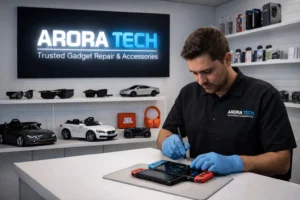
When Professional Repair Is the Best Solution
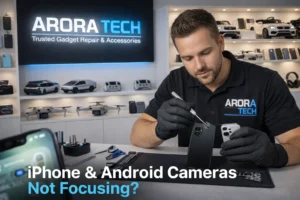
If your iPhone & Android Camera still won’t focus after basic troubleshooting, professional repair is the safest option.
Signs You Need Expert Repair
- Camera module physically damaged
- Autofocus motor failure
- Internal dust or moisture
- Lens cracked or scratched
- Camera shaking or vibrating
Modern phones require:
- Precision tools
- Genuine or OEM-grade parts
- Camera calibration software
2026 Camera Repair Solutions: What Technicians Actually Do
Professional repair shops now use advanced methods:
Camera Module Replacement
Entire camera assembly replaced for guaranteed focus restoration.
Lens Replacement
Fixes scratches or cracks without replacing the full module.
Sensor Realignment
Corrects stabilization and autofocus alignment after drops.
Software Calibration
Re-trains AI autofocus algorithms for accurate focusing.
Why Local Repair Matters More Than Ever
Sending your phone away risks:
- Data exposure
- Long wait times
- Shipping damage
Local repair ensures:
- Face-to-face diagnostics
- Faster turnaround
- Accountability
This is why many New Jersey residents prefer trusted local repair professionals rather than mail-in services.
Subtle Help When You Need It: A Local Repair Option
If you’re already visiting the Gloucester Premium Outlets, there’s a discreet tech repair store many shoppers rely on for camera issues, battery replacements, and diagnostics.
📍 Store Address:
Next to UGG’s, 100 Premium Outlets Dr Store #785, Gloucester Premium Outlets, Blackwood, NJ 08012, United States
Many customers stop by for quick camera diagnostics while shopping—no pressure, just solutions.
How Much Does iPhone & Android Camera Repair Cost in 2026?
Prices vary based on:
- Phone model
- Camera type
- Damage severity
Average Repair Ranges:
- Lens replacement: $50–$120
- Camera module replacement: $90–$250
- Water damage repair: varies
Getting a diagnosis first prevents unnecessary expenses.
Repair or Replace: What Makes Sense?
Repair If:
- Phone is under 3 years old
- Camera is main issue
- Cost < 40% of phone value
Replace If:
- Multiple components failing
- Severe water damage
- Repair exceeds resale value
Preventing Future Camera Focus Issues
Protect your iPhone & Android Camera with these habits:
- Use a quality case with camera lip
- Avoid humid environments
- Clean lens weekly
- Don’t keep phone loose with keys
- Update software responsibly
Easy Ways to Get Help or Ask Questions
If you want advice or a quick estimate:
📞 Call Now:
+1 856-723-6939
📧 Email:
techbyarora@gmail.com
🛠 Repair Request Form:
Submit Repair Form
Helpful Resources
Final Thoughts: Clear Photos Are Still Possible
A blurry iPhone & Android Camera doesn’t mean your phone is finished. In 2026, camera repair technology is more advanced than ever, making it possible to restore focus, clarity, and performance without replacing your device.
Whether you fix it yourself or consult a local professional, the key is understanding the problem early. Small camera issues become expensive ones when ignored.
For those in New Jersey, many users rely on trusted local repair services when everyday tech problems arise—especially when they want honest advice, fast solutions, and no unnecessary upselling.
🔎 You can also find local reviews here:
Arora Tech New Jersey on Google


 by
by